
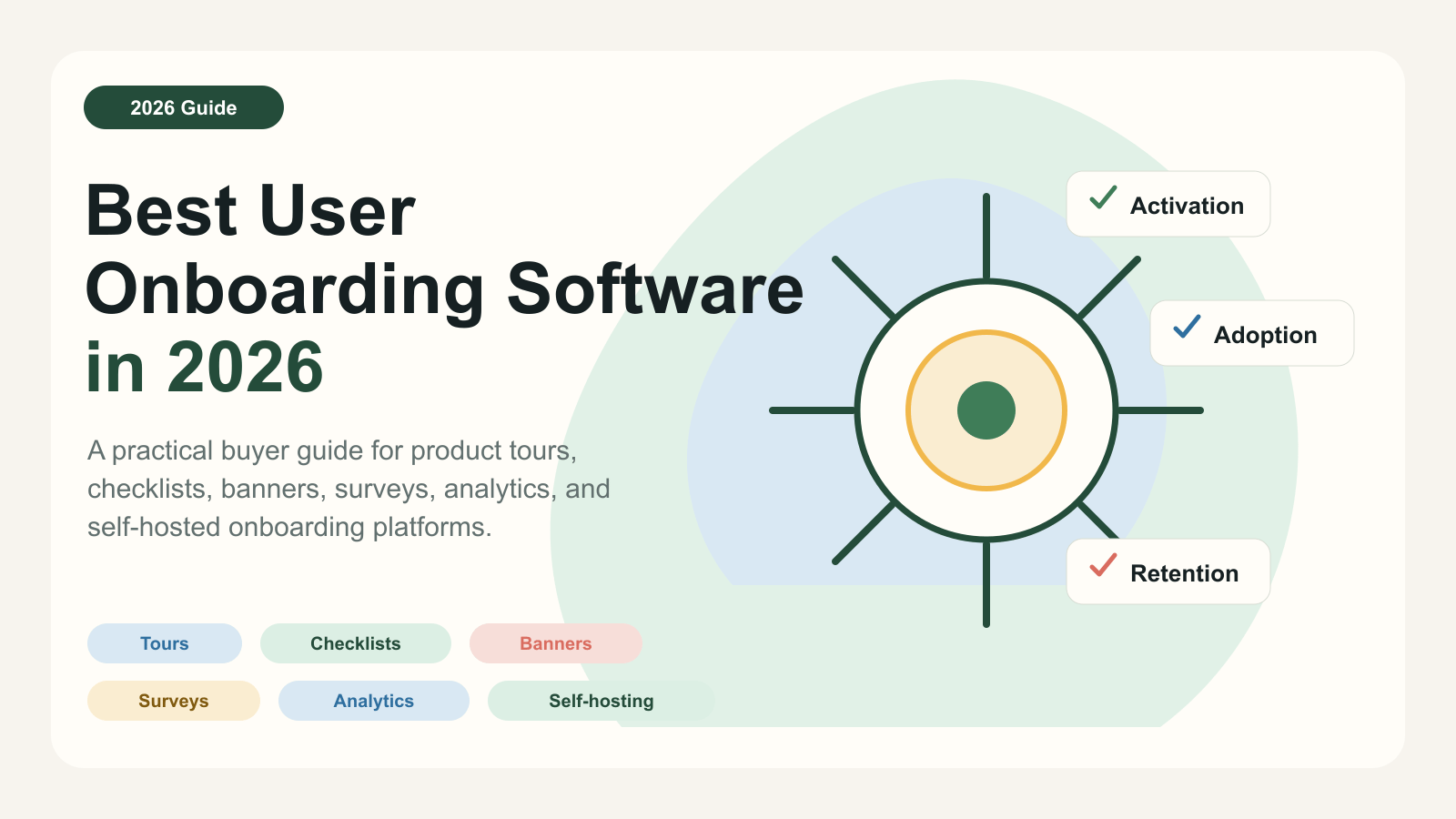
If you are searching for the best user onboarding software in 2026, you are probably not just looking for a prettier product tour.
You are trying to answer a more serious question:
Which tool will help new users reach value faster?
That is why the user onboarding category keeps expanding. A few years ago, most teams compared onboarding tools by looking at tooltips, modals, and step-by-step tours. In 2026, that is not enough. SaaS teams now want onboarding software that can target the right users, react to product behavior, measure activation, support multiple onboarding surfaces, and fit the way the team actually works.
Some teams need a lightweight product tour tool. Some need a no-code onboarding platform. Some need product analytics and in-app guidance in one system. Some need self-hosting because user data cannot leave their environment. Enterprise teams may need a full digital adoption platform for employee-facing software.
Those are very different buying situations.
This guide compares the best user onboarding software in 2026 from that perspective.
Pricing and feature notes were checked against public vendor pages on June 4, 2026. Pricing changes often, so use the linked official pages before making a final purchase decision.
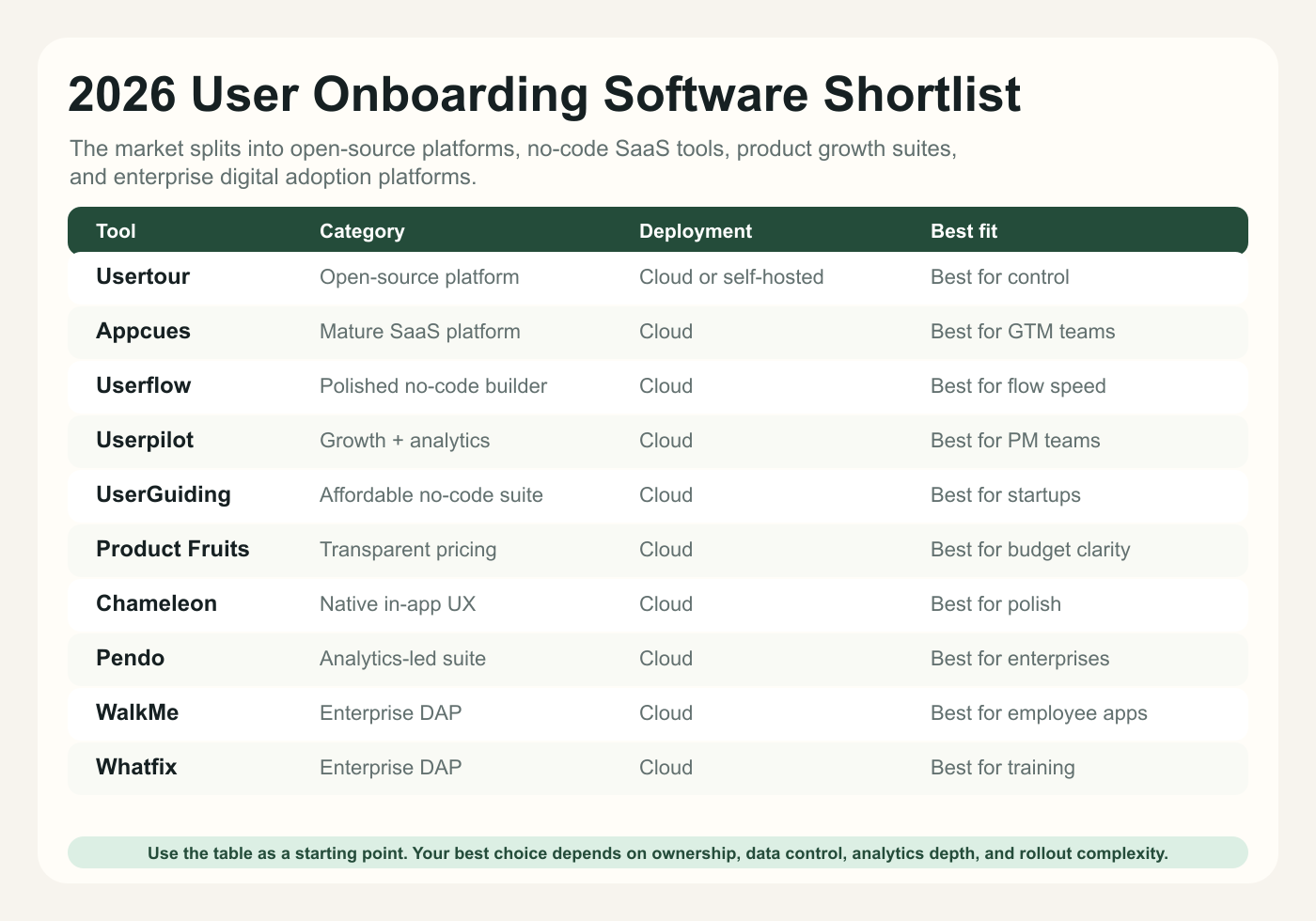
Quick picks#
If you want the short version:
Product tours, checklists, surveys, banners, launchers, analytics, and deployment control.
Broad product experience platform with strong customer success support.
Polished builder, checklists, analytics, and clear public pricing.
In-app engagement, segmentation, usage analytics, feedback, and NPS.
Guides, checklists, surveys, resource centers, and accessible pricing.
Adaptive onboarding, knowledge base, integrations, and visible MAU-based plans.
Product tours, banners, checklists, microsurveys, experiments, and precise targeting.
Product analytics, in-app guides, session replay, and retroactive analytics.
Enterprise DAP for complex workflows, automation, analytics, and governance.
In-app flows, task lists, smart tips, analytics, and digital adoption services.
What changed in 2026#
The biggest shift is that user onboarding is no longer judged by whether users completed a tour.
Completion rate still matters, but it is not the end goal. A user can complete a tour and still fail to activate. A user can dismiss a checklist and still become successful. A banner can drive more value than a modal if it appears at the right moment.
In 2026, better onboarding teams care about four things.
First, they care about activation outcomes. The real question is whether users complete the next meaningful action, not whether they saw an overlay.
Second, they care about behavior-based timing. Page-based onboarding is still useful, but many of the best experiences now depend on events: project created, teammate invited, integration connected, first report exported, trial limit reached, or feature used for the first time.
Third, they care about ownership. If every onboarding edit requires an engineering ticket, the team will move slowly. If every message can be launched without guardrails, the product will become noisy. Good onboarding software gives product, growth, customer success, and engineering the right level of control.
Fourth, they care about deployment and data control. Hosted SaaS is convenient, but open-source and self-hosted onboarding tools matter more when teams have strict privacy, security, or infrastructure requirements.
That is why the best user onboarding software in 2026 is not one universal winner. The best tool depends on what kind of onboarding system you are building.
How to evaluate user onboarding software#
Before comparing tools, decide what kind of workflow you need.
1. Onboarding surfaces#
A basic tool may only support product tours and tooltips. A more complete platform may support:
- Product tours
- Tooltips
- Checklists
- Launchers
- Banners
- Surveys and NPS
- Resource centers
- In-app announcements
- Analytics dashboards
If your onboarding strategy is only "show a welcome tour," a lightweight tool may be enough. If you want to guide users across activation, adoption, feedback, and lifecycle messaging, you need a platform.
2. Targeting and triggering#
The difference between helpful onboarding and annoying onboarding is usually timing.
Look for:
- User attribute targeting
- Account or company targeting
- URL and page rules
- Element detection
- Event-based triggers
- Repeat limits
- Temporary hide or suppression rules
- Priority handling when multiple messages are eligible
This matters because SaaS onboarding is rarely linear. Users move through the product at different speeds, with different roles, jobs, and levels of readiness.
3. Analytics#
At minimum, you want to know:
- Who saw the onboarding
- Who started it
- Who completed it
- Where users dropped off
- Which steps caused friction
- Which onboarding experiences influenced activation
Views and clicks are useful, but they are weak signals on their own. The stronger question is whether onboarding changed user behavior.
4. Team workflow#
Ask who will own the tool day to day.
If engineering owns onboarding, a code-first library or open-source platform can work well. If product or growth owns onboarding, a visual builder matters. If customer success owns lifecycle nudges, checklists, banners, and segmentation become more important.
For larger companies, permissions, environments, approvals, localization, and audit trails can matter as much as the builder itself.
5. Pricing model#
Most onboarding tools price by monthly active users, monthly tracked users, sessions, products, seats, or custom enterprise contracts.
The pricing model matters because onboarding is often used more as your product grows. A tool that looks affordable at 2,000 MAUs may become expensive at 50,000 MAUs. A tool that charges by session may be better for some teams than one that charges by active users. A self-hosted option may be more predictable if your team has the infrastructure to run it.
1. Usertour#
Usertour is best for SaaS teams that want a full onboarding platform with open-source leverage and self-hosting options.
Since this article is published by Usertour, it is worth being direct about the positioning. Usertour is not trying to be an enterprise digital adoption platform for every internal software rollout. It is designed for teams that want to build product tours, checklists, banners, surveys, launchers, and contextual in-app guidance for web products, with more control over deployment and data than most hosted-only tools provide.
Usertour fits especially well when you care about:
- Open-source availability
- Cloud or self-hosted deployment
- Product tours and multi-step flows
- Checklists for activation paths
- Banners for in-app communication
- Surveys and NPS
- Launchers and contextual help
- Targeting rules and event-driven onboarding
- Analytics for onboarding performance
- A lower-cost path than many traditional SaaS onboarding platforms
The public Usertour pricing page lists a free Hobby cloud plan and paid cloud plans starting at $59/month on monthly billing. The GitHub repository also describes Usertour as an open-source user onboarding platform with tours, checklists, launchers, surveys, cloud usage, and self-hosting.
The main tradeoff is operational responsibility. If you choose self-hosting, your team needs to care about deployment, updates, monitoring, and infrastructure. That is a good tradeoff for teams that value control, but it is not the lowest-effort path.
Choose Usertour if you want user onboarding software that feels closer to an open-source product adoption platform than a hosted-only black box.
Official links:
2. Appcues#
Appcues is one of the most established names in user onboarding software.
It is a strong fit for SaaS teams that want a mature hosted platform for onboarding, product adoption, in-app messaging, feedback, and growth campaigns. Appcues is also a good choice for teams that value implementation help, customer success, and a long-running vendor in the category.
The current Appcues pricing page does not show simple public tier pricing in the same way some newer tools do. It says pricing is based on monthly active users and the number of installations, and that every plan includes every experience type, feature, and integration from day one. Appcues also offers a free trial, but the page says the trial starts with a call to confirm fit.
That tells you the buying motion: Appcues is not mainly competing on the cheapest entry price. It is competing on maturity, breadth, and hands-on support.
Choose Appcues if:
- You want a polished hosted product experience platform
- You value support and onboarding from the vendor
- Your team wants broad onboarding and in-app communication coverage
- You are comfortable with a sales-led evaluation
The main tradeoff is that smaller teams looking for transparent low-cost pricing or self-hosting may find it heavier than they need.
Official link: Appcues pricing
3. Userflow#
Userflow is best for teams that want a fast, polished no-code builder for onboarding flows and product adoption experiences.
The product is known for a clean builder experience, and its pricing page is unusually clear for this category. As of June 4, 2026, Userflow pricing lists:
- Startup at $240/month paid annually, or from $300/month on monthly billing
- Pro at $680/month paid annually, or from $850/month on monthly billing
- Enterprise with custom pricing
The page also lists 3,000 included MAUs for Startup and 10,000 included MAUs for Pro, with add-on MAU bundles available.
Userflow is a strong option if your team wants to move quickly without building onboarding UI from scratch. It is especially attractive for product and growth teams that want to create flows, checklists, and in-app experiences with minimal engineering involvement after the initial snippet is installed.
Choose Userflow if:
- You want one of the smoother no-code onboarding builders
- You are comfortable with hosted SaaS
- You want clear public pricing
- Your team values speed and polish over self-hosting
The main tradeoff is cost at scale. Userflow can be a strong product, but the Pro tier and MAU add-ons can become meaningful budget items for growing SaaS products.
Official link: Userflow pricing
4. Userpilot#
Userpilot is best for product teams that want onboarding, product growth, feedback, and analytics in one platform.
The Userpilot pricing page positions pricing around monthly active users. Its Starter plan is listed from $299/month paid annually and includes up to 2,000 monthly active users, in-app user engagement, user segmentation and tracking, usage trend analysis, and NPS surveys.
The feature comparison also shows onboarding and engagement surfaces such as flows, spotlights, banners, embeds, checklists, and resource centers. Userpilot has also been expanding into areas like session replay and AI-assisted analysis, although some of those features are marked as coming soon or add-ons depending on plan.
Choose Userpilot if:
- Your product team wants onboarding plus product analytics
- You care about segmentation, tracking, and feedback loops
- You want more than a simple tour builder
- You are comfortable with an MAU-based hosted platform
The main tradeoff is entry price. Userpilot may be more than a very early-stage startup needs if the immediate requirement is only product tours and basic onboarding.
Official link: Userpilot pricing
5. UserGuiding#
UserGuiding is best for teams that want a more affordable no-code onboarding suite.
Its pricing page lists a forever free Support Essentials plan focused on support content, plus paid adoption plans. As of June 4, 2026, the page shows Starter at $174/month billed yearly and Growth at $349/month billed yearly. It also lists onboarding guides, hotspots, checklists, surveys, banners, resource centers, product updates, knowledge base, and AI assistant features across plans.
UserGuiding is a practical choice for startups and small SaaS teams that want to launch guides, checklists, and basic in-app experiences without paying enterprise-level prices.
Choose UserGuiding if:
- You want no-code onboarding at a relatively accessible price
- You need guides, checklists, surveys, and resource centers
- You want a tool that product or customer success teams can operate
- You are mainly focused on web apps
One important limitation: UserGuiding says it does not support native mobile apps at the moment, although web browser display is supported. If native mobile onboarding is a core requirement, verify fit carefully.
Official link: UserGuiding pricing
6. Product Fruits#
Product Fruits is best for teams that want transparent pricing and a broad onboarding toolkit without jumping into enterprise software.
The Product Fruits pricing page is clear about MAU-based pricing. At 1,500 MAUs on annual billing, it lists Starter at $96/month and Pro at $149/month. The page also references adaptive onboarding, onboarding creator agent, public and private knowledge base options, integrations, custom events, onboarding analytics, roles and permissions, workspaces, and support services.
Product Fruits is worth considering when budget predictability matters. It may not have the same enterprise positioning as Pendo, WalkMe, or Whatfix, but many SaaS teams do not need that level of platform.
Choose Product Fruits if:
- You want transparent pricing
- You need a practical onboarding toolkit for a web product
- You care about integrations like Segment, Mixpanel, HubSpot, Zapier, or REST API
- You want onboarding analytics without buying a larger product analytics suite
The main tradeoff is category depth. Product Fruits is a sensible adoption tool, but teams that need deep enterprise governance, advanced analytics, or self-hosting should compare it carefully against other options.
Official link: Product Fruits pricing
7. Chameleon#
Chameleon is best for teams that care deeply about native-feeling, polished in-app experiences.
The Chameleon pricing page says pricing scales with Monthly Tracked Users. It lists Startup, Growth, and Enterprise options, and highlights in-app UX patterns such as product tours, banners, checklists and resource centers, NPS and microsurveys, tooltips, interactive demos, AI features, targeting, event triggering, A/B testing, and integrations.
Chameleon is a strong fit for product-led growth teams that want onboarding and in-app campaigns to feel like part of the product rather than a generic overlay system. It is also useful when teams care about experiments, segmentation, rate limiting, element detection, and polished UX.
Choose Chameleon if:
- You want high-quality in-app UX patterns
- You care about non-disruptive onboarding and embedded messaging
- You need experiments, targeting, and integrations
- You are comfortable with a hosted SaaS vendor and MTU-based pricing
The main tradeoff is complexity and sales motion as you grow. Chameleon can be powerful, but teams should make sure they need its level of campaign control before committing.
Official link: Chameleon pricing
8. Pendo#
Pendo is best for larger teams that want product analytics and in-app guidance together.
The Pendo pricing page lists custom pricing and includes product analytics and in-app guides in its Core plan. Higher-level packaging includes session replay and other advanced capabilities. Pendo also emphasizes retroactive analytics, which means teams can access product usage history captured after installation even if they define features or pages later.
Pendo is not usually the lightest user onboarding tool. It is better understood as a software experience management platform with onboarding as one important part of a broader analytics and engagement system.
Choose Pendo if:
- Product analytics is a central requirement
- You want in-app guides plus user behavior data
- You have enterprise procurement and implementation capacity
- You need a platform used across product, customer success, and leadership teams
The main tradeoff is that Pendo can be heavy if your primary job is simply to launch onboarding flows, checklists, and surveys quickly.
Official link: Pendo pricing
9. WalkMe#
WalkMe is best for enterprise digital adoption, especially employee-facing software and complex internal workflows.
The WalkMe pricing page is quote-based. It positions WalkMe as a digital adoption platform with in-app guides, tooltips, notifications, personalized onboarding, product tours, targeted surveys, analytics, segmentation, automation, localization, governance, data privacy controls, and enterprise administration.
WalkMe is not the typical first choice for a small SaaS team that wants to improve trial activation. It is more often evaluated by large organizations that need to drive adoption across internal systems, enterprise software, business processes, and employee workflows.
Choose WalkMe if:
- You are solving enterprise digital adoption
- You need governance, automation, and multi-application support
- You are guiding employees through complex workflows
- You have budget and internal ownership for a full DAP rollout
The main tradeoff is weight. WalkMe can be powerful, but it may be more platform than a product-led SaaS onboarding team needs.
Official link: WalkMe pricing
10. Whatfix#
Whatfix is best for enterprise training, support, and digital adoption programs.
The Whatfix pricing page explains that pricing includes a flat fee plus user license fees. Its digital adoption platform includes capabilities such as tagging user actions, adoption dashboards, auto tracking, custom dashboards, funnel insights, in-app guidance, and support services. Whatfix also positions its platform around employee training, workflow optimization, AI adoption, change management, and digital transformation.
Like WalkMe, Whatfix is not just a SaaS user onboarding tool. It is an enterprise digital adoption platform. It makes the most sense when the problem is bigger than new user onboarding inside one product.
Choose Whatfix if:
- You are rolling out software to employees or enterprise users
- Training and workflow support are core requirements
- You need analytics, dashboards, and adoption governance
- You want vendor services around digital adoption programs
The main tradeoff is fit. For a SaaS startup focused on self-serve activation, Whatfix may be too enterprise-oriented. For a large organization running adoption across complex systems, it belongs on the shortlist.
Official link: Whatfix pricing
Which tool should you choose?#
The easiest mistake is to compare all of these tools as if they solve the same problem.
They do not.
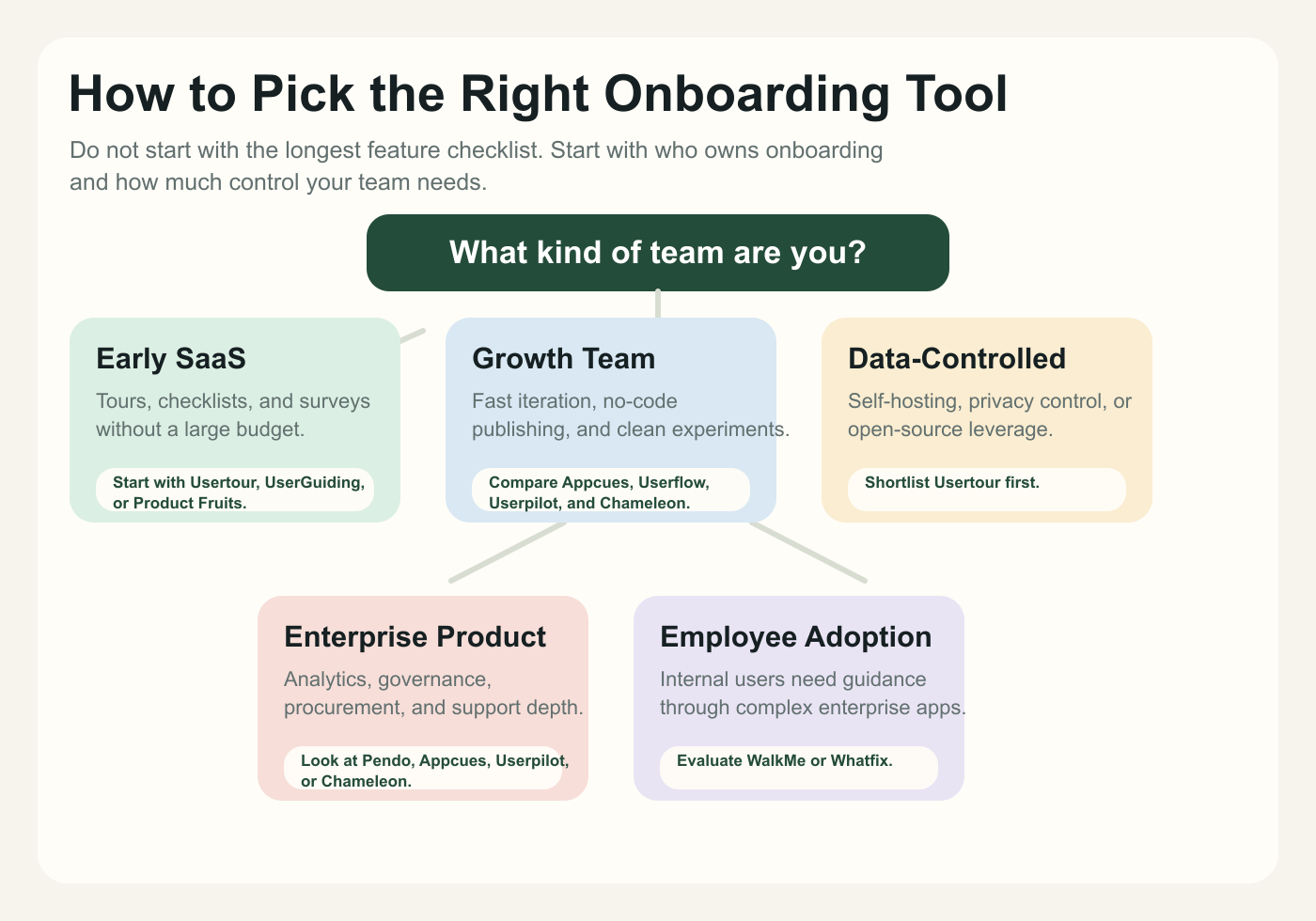
Choose Usertour if you want an open-source user onboarding platform with cloud and self-hosted options, especially for a web SaaS product where control, pricing, and data ownership matter.
Choose Appcues if you want a mature hosted product experience platform with strong customer success support and a sales-assisted buying process.
Choose Userflow if you want a polished no-code flow builder and are comfortable paying for speed and ease of use.
Choose Userpilot if your onboarding strategy is closely tied to product analytics, segmentation, and feedback.
Choose UserGuiding or Product Fruits if you want a practical no-code onboarding tool with more accessible pricing.
Choose Chameleon if you care about polished, native-feeling in-app UX, experiments, and precise targeting.
Choose Pendo if product analytics is the center of your product adoption strategy.
Choose WalkMe or Whatfix if you are solving enterprise digital adoption, especially for employee-facing software or complex internal workflows.
Final takeaway#
The best user onboarding software in 2026 is not the tool with the longest feature list.
It is the tool that matches your onboarding operating model.
If onboarding is owned by engineering and must live close to your product infrastructure, prioritize control and deployment flexibility. If onboarding is owned by product or growth, prioritize visual editing, targeting, analytics, and fast iteration. If onboarding is part of an enterprise digital transformation program, prioritize governance, services, analytics, and workflow coverage.
For many SaaS teams, the strongest modern pattern is this:
- Use tours when the user needs step-by-step guidance
- Use checklists when activation requires multiple milestones
- Use banners when the product needs to communicate without interrupting
- Use surveys when you need feedback at the right moment
- Use events to decide when onboarding should appear
- Use analytics to measure whether onboarding changed behavior
That is the direction the category is moving.
User onboarding is no longer just a tour. It is becoming an activation system.