
Most product onboarding starts with a simple question:
What should a new user see first?
That question is useful, but it can also lead teams into a narrow version of onboarding. They build a welcome modal, a product tour, or a checklist that appears immediately after signup. The experience may look polished, but it is often disconnected from what the user is actually doing.
A better question is:
What should the user see after they take a meaningful action?
That is the idea behind event-driven onboarding.
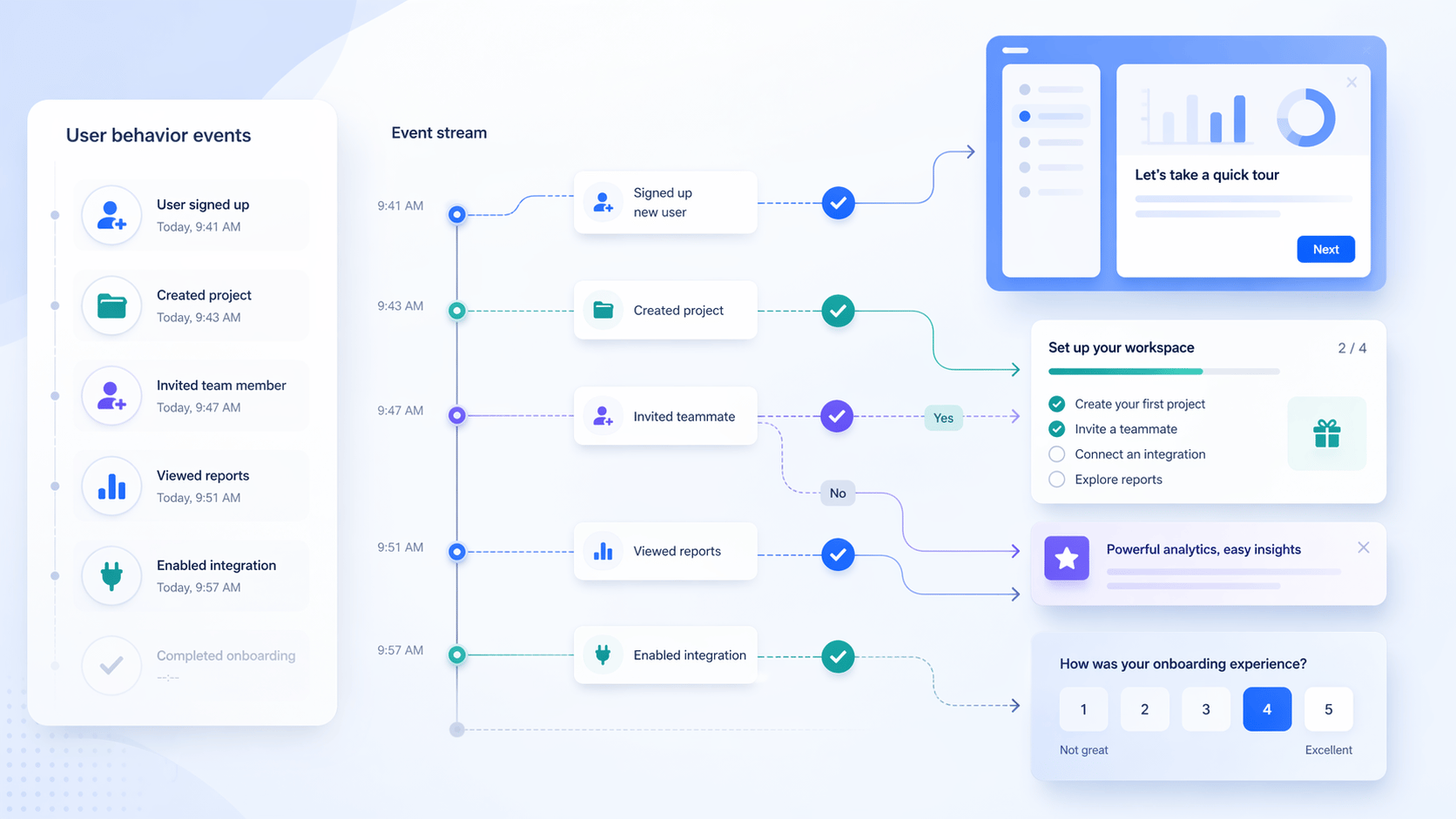
Instead of showing guidance only because someone landed on a page, event-driven onboarding uses product behavior as the signal. A user created a project. They invited a teammate. They connected an integration. They ignored a key setup step. They reached a usage milestone. Each of those events tells you something about intent, readiness, or friction.
When onboarding responds to those signals, it feels less like a generic tutorial and more like timely product guidance.
What event-driven onboarding means#
An event is a meaningful action or state change inside your product.
Examples include:
project_createdintegration_connectedteammate_invitedreport_exportedfeature_used_first_timetrial_limit_reachedbilling_page_viewed
Event-driven onboarding uses those signals to decide when a product tour, checklist, banner, survey, or launcher should appear.
That is different from page-based onboarding.
Page-based onboarding says: "The user is on the dashboard, so show this guide."
Event-driven onboarding says: "The user created their first workspace but has not invited a teammate, so show the next best action."
The second approach is more useful because it includes context. It does not just know where the user is. It knows what they have already done and what they are likely ready to do next.
Why timing matters more than volume#
Many onboarding problems are not content problems. They are timing problems.
A product tour can be well written and still fail if it appears before the user understands why the feature matters. A checklist can include the right steps and still feel like clutter if the user has already completed half of them. A banner can announce an important launch and still be ignored if it reaches the wrong segment.
Event-driven onboarding helps because it gives product teams a better timing model.
Instead of trying to teach everything upfront, you can guide users in stages:
- Show setup help when the user has intent
- Introduce advanced features after the core workflow is complete
- Ask for feedback after the user has experienced value
- Promote upgrades when usage indicates a real need
- Hide or delay guidance when the user is in a sensitive workflow
This is especially important for SaaS products, where activation is rarely a single click. A user often needs to complete a chain of actions before they experience value.
For example, an analytics product might need a user to create a project, install a snippet, send the first event, and view a dashboard. A collaboration product might need the user to create a workspace, invite teammates, and complete a shared task. A developer tool might need a user to generate an API key, make a first request, and inspect the response.
The best onboarding path is not "show everything after signup." It is "help the user complete the next meaningful step."
The four event types worth starting with#
You do not need to track every click to build good event-driven onboarding. In fact, tracking too much too early can make the system harder to reason about.
Start with events that change what guidance should happen next.
1. Activation events#
Activation events are the actions that prove the user is moving toward value.
Examples:
- Created the first project
- Imported data
- Published the first flow
- Invited the first teammate
- Connected the first integration
These events are useful because they help you decide when to introduce the next step. If the user has not completed the activation event, guidance should probably focus on getting them there. If they have completed it, the next experience can move deeper into adoption.
2. Readiness events#
Readiness events show that a user is prepared for a more advanced workflow.
Examples:
- Viewed a feature page multiple times
- Completed the basic setup checklist
- Used a core feature several times
- Reached a usage threshold
These events are useful for progressive onboarding. Instead of introducing every feature immediately, you can wait until the user has enough context to care.
3. Friction events#
Friction events suggest that the user may be stuck.
Examples:
- Started setup but did not finish
- Repeatedly returned to the same configuration page
- Dismissed the same checklist step multiple times
- Hit an error state
- Reached an empty state without taking action
These events are useful for support-oriented onboarding. A tooltip, banner, or short flow can help the user recover without forcing them to search docs or contact support.
4. Expansion events#
Expansion events show that the user may be ready for more value.
Examples:
- Reached a plan limit
- Used a feature frequently
- Added multiple teammates
- Created multiple projects
- Completed a high-value workflow
These events are useful for product-led growth. The goal is not to interrupt users with upgrade prompts everywhere. The goal is to surface the right message when the need is already visible.
How to design an event-driven onboarding flow#
A practical event-driven onboarding system has five parts.
1. Define the user journey as milestones#
Start by writing down the few moments that matter most.
For a B2B SaaS product, that might look like:
- Account created
- Workspace configured
- First data source connected
- First result produced
- First teammate invited
- First repeat use
This gives your onboarding a structure. You are no longer designing isolated popups. You are designing guidance between milestones.
2. Choose the event that proves each milestone happened#
Every milestone needs a signal.
If the milestone is "workspace configured," the event might be workspace_settings_saved. If the milestone is "first value experienced," the event might be dashboard_viewed_after_data_import. If the milestone is "team adoption started," the event might be teammate_invited.
The event should be specific enough to represent real progress.
3. Decide what should happen next#
After each event, ask:
What is the next best action for this user?
That action might be:
- Start a product tour
- Show a checklist step
- Display a banner
- Ask a short survey question
- Make a launcher resource more prominent
- Do nothing because the user is already on track
"Do nothing" is important. Good onboarding is not measured by how many messages you show. It is measured by whether the right guidance appears at the right moment.
4. Combine events with page and UI context#
Events are powerful, but they should not be the only condition.
If a user triggers integration_connected, you may still want to wait until they are back on the dashboard before showing a tour. If a flow points to a specific button, you should confirm the element exists before starting. If the user is on billing, checkout, or another sensitive surface, you may want to temporarily hide non-critical guidance.
This is where rules matter.
Events tell you what happened. Page rules, element checks, wait conditions, priority, frequency, and temporary hide rules help decide whether now is a good moment to show something.
That combination is what makes onboarding feel calm instead of noisy.
5. Measure the action after the guidance#
The best success metric is not whether the user saw the onboarding. It is whether the user completed the next meaningful action.
For example:
- After a setup checklist appears, did setup completion improve?
- After a feature tour appears, did feature usage increase?
- After a banner announces a launch, did users click the CTA?
- After a survey appears, did you collect useful feedback from the right segment?
This closes the loop. Events trigger onboarding, and downstream events show whether the onboarding worked.
Where Usertour fits#
Usertour is built around this kind of contextual product guidance.
With Usertour, teams can create flows, checklists, banners, surveys, and launchers, then use targeting rules to decide who should see them and when. Event Trackers add another layer to that system by making behavior-based logic easier to manage inside the product.
That means a team can build experiences like:
- A checklist that appears after a user creates their first project
- A tour that starts only after the relevant feature becomes available
- A banner that promotes an integration only to accounts that have not connected it
- A survey that asks for feedback after a user completes a workflow
- A launcher that gives advanced users self-serve help without interrupting beginners
The product benefit is simple: onboarding becomes responsive.
It can react to user progress, not just page loads. It can support activation, adoption, feedback, and expansion from the same underlying logic.
If you want a deeper look at how Usertour decides whether content should appear, read How Usertour Decides When a Flow or Checklist Should Appear.
Common mistakes to avoid#
Event-driven onboarding is powerful, but it can go wrong if the system becomes too eager.
The first mistake is triggering guidance after every small action. Not every event deserves a message. If a user receives a new tooltip after every click, the product starts to feel less intelligent, not more.
The second mistake is using events without context. A user may have completed the right action, but the current screen may still be the wrong place to interrupt them. Pair event logic with page, element, priority, frequency, and hide rules.
The third mistake is measuring only views and clicks. Those metrics are useful, but they do not prove activation. Always connect onboarding performance to the behavior you wanted to influence.
The fourth mistake is treating events as a purely technical implementation detail. Product teams should be involved in naming and choosing events because those events become the language of the onboarding system.
A simple playbook#
If you are starting from scratch, keep it small.
Pick one activation milestone that matters. Choose three to five events around that milestone. Build one flow, checklist, or banner that helps the user move forward. Add rules so it only appears in the right context. Then review whether the next meaningful action improved.
For example:
- Milestone: user publishes their first onboarding flow
- Event:
flow_created - Missing action:
flow_published - Guidance: checklist step explaining how to preview and publish
- Safety rule: hide on billing and account settings pages
- Success metric: increase in first published flow rate
That is enough to prove the model.
Once it works, you can expand the same pattern across activation, adoption, retention, and expansion.
Final takeaway#
The future of onboarding is not more tutorials. It is better timing.
Users do not need every explanation at the beginning. They need the right guidance when they are ready for the next step.
Event-driven onboarding gives product teams a practical way to do that. It turns user behavior into a signal, connects that signal to product guidance, and measures whether the guidance helped the user move forward.
That is how onboarding becomes less like a tour and more like a product growth system.