
One of the most common onboarding questions is surprisingly simple:
Why does a flow that is configured to start automatically sometimes not appear?
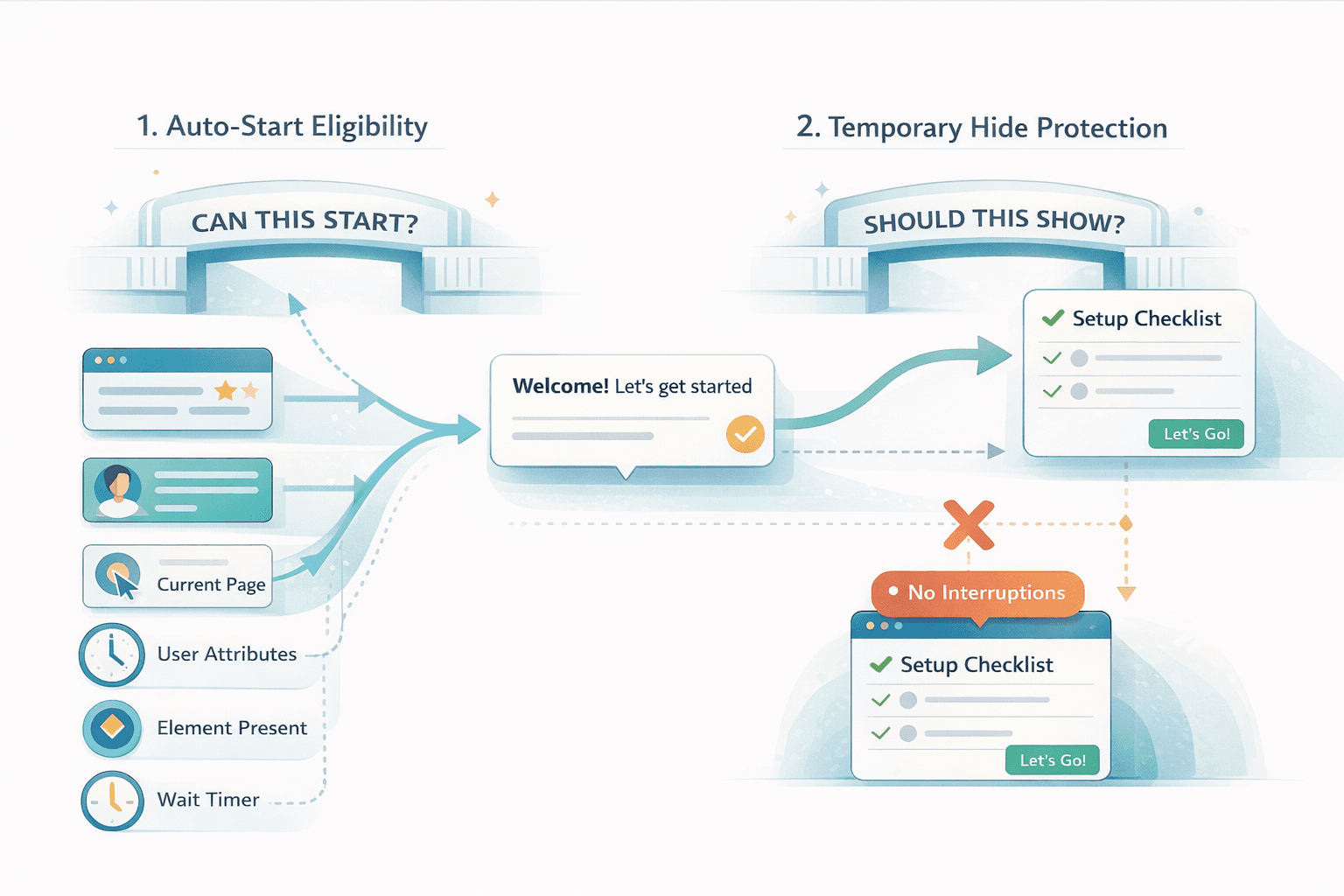
If you only look at the UI, it is easy to assume that "Start Automatically" is the whole story. But in practice, Usertour uses a two-layer decision model.
The short version is this:
- Auto-start rules decide whether content is eligible to start
- Temporary hide rules decide whether content must stay out of the way
That distinction is the key to building onboarding that feels helpful instead of interruptive.
The mental model#
The easiest way to think about Usertour is as a system with two gates.
Gate 1: Can this content start?#
This is what auto-start rules answer.
A Flow or Checklist becomes eligible when its start conditions are satisfied. That might be based on:
- User attributes
- The current page
- Another flow or checklist being completed
- An element being present or clicked
- Input state
- Time-based conditions
- A wait delay
This is your targeting layer. It answers "when would this piece of onboarding be useful?"
Gate 2: Should this content stay hidden right now?#
This is what temporary hide rules answer.
Even if a flow is eligible to start, Usertour can still suppress it if the current context is a bad time to show it. For example:
- The user is on a billing page
- The user is in checkout
- The checklist should be hidden in settings
- A launcher should not appear inside a resource center
This is your protection layer. It answers "when would showing this be disruptive?"
What actually happens at runtime#
Under the hood, Usertour is not just rendering UI from the browser.
There are three moving parts:
- A server-side orchestrator that decides what should be active
- A client SDK that observes browser-only conditions like page URL, DOM elements, and user interactions
- A rules engine that evaluates conditions and combines them into a final decision
That architecture matters because some onboarding rules can only be evaluated in the browser, while others depend on stored user data or past content history.
In practice, the decision flow looks like this:
- Check whether auto-start rules are active
- Check frequency settings such as once, multiple times, or unlimited
- Check whether temporary hide rules are blocking the content
- Check whether any configured wait timer has fired
- If multiple items qualify, choose based on priority
So if a Flow does not appear, the problem is often not "auto-start failed." It may be blocked by repeat limits, waiting for a delay, losing on priority, or being actively hidden.
Why this design is useful#
This split between eligibility and suppression gives you much more control than a single "show or do not show" toggle.
It lets you say:
- Start this onboarding when the user reaches the dashboard
- But never show it during a payment workflow
Or:
- Show this checklist after setup is complete
- But hide it on login screens and onboarding wizards
That is what makes onboarding feel contextual instead of noisy.
Real examples#
Here are a few practical ways to use the model well.
1. First-time user onboarding#
If you want a welcome flow to appear only for new users, use an auto-start rule based on a user attribute such as is_new_user=true.
That gives you explicit targeting and works well with the default "once per user" frequency behavior.
2. Feature discovery on a specific page#
If you want to introduce a feature on /dashboard, use a page-based auto-start rule. In single-page apps, it is often better to combine that with:
- An element-present condition
- A short wait
That avoids starting too early before the UI is actually ready.
3. Progressive onboarding#
If Flow B should only appear after Flow A is completed, use a Flow or Checklist condition such as "Flow A completed" rather than trying to simulate sequencing manually.
That creates a cleaner onboarding path and keeps your progression logic understandable.
4. Preventing interruptions#
If your users move through sensitive workflows like billing, checkout, or payment, temporary hide rules are the safer tool.
Instead of trying to narrowly target every allowed page, you can let onboarding be broadly eligible and then explicitly suppress it in high-risk moments.
5. Showing checklists at the right time#
Checklists are persistent by nature, which makes them powerful but also easy to overuse.
If a checklist appears too early, it can feel like permanent clutter. A better approach is:
- Start it only after setup is complete
- Hide it in contexts where it is not relevant
That gives the checklist a better chance of feeling like a helpful anchor instead of background noise.
The most common mistake#
The biggest implementation mistake is using temporary hide rules as the main targeting system.
That usually leads to onboarding logic that is harder to reason about:
- Content is technically eligible almost everywhere
- Hide rules carry too much responsibility
- It becomes harder to explain why something did or did not appear
As a rule of thumb:
- Use auto-start rules to define when content should start
- Use temporary hide rules to define when content must not interrupt
That keeps the logic much easier to debug and maintain.
Another mistake: trusting page rules alone in SPAs#
Modern apps often render asynchronously. A route may have changed, but the UI you want to point at is not ready yet.
That is why page rules alone are often not enough in single-page apps. If your onboarding depends on a specific element, combine page targeting with:
- Element presence
- A short wait
That small change usually makes onboarding feel much more reliable.
A better way to think about Usertour rules#
If you remember only one thing, make it this:
Auto-start rules answer "should this become eligible?"
Temporary hide rules answer "should this stay invisible right now?"
Once you separate those two jobs, the rest of the system starts to make sense. Your flows become easier to predict, your checklists become less noisy, and your onboarding feels much more intentional.
That is also why teams often get better results when they design onboarding around user readiness first, and interruption prevention second.
Final takeaway#
Usertour does not treat onboarding as a simple trigger.
It treats visibility as a decision:
- Is this relevant now?
- Is this safe to show now?
- Is there anything higher priority?
- Has this already been shown too many times?
That model is what allows onboarding to be both contextual and respectful.
If you want better product tours and checklists, the practical strategy is simple:
- Use auto-start rules for eligibility
- Use hide rules for safety
- Add waits and element checks when the UI loads asynchronously
- Treat priority and repeat settings as product decisions, not just technical defaults
That is how you move from "why did this popup appear?" to onboarding that shows up at the right moment and stays out of the way when it should.